How do I find a patient?
In the left column, use search by patient name and the Current / Archive switch. The patient row shows full name, consultation dates, monitoring scenario, and message badges.
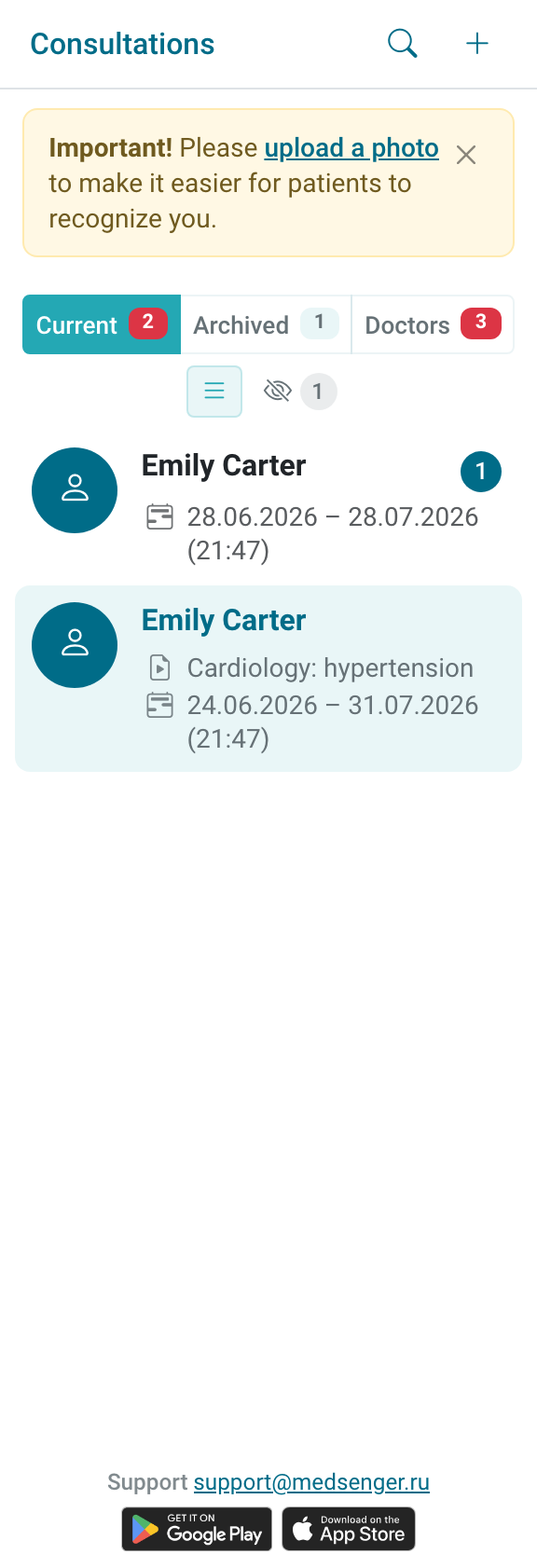
Main list indicators:
The list is sorted by last message time. Filters and badges help quickly identify consultations where the doctor has work: unread messages, unanswered questions, overdue responses, or response deadline warnings.
Look not only at row order but also at badges: it is better to open a patient with a red overdue badge before a patient with a newer message that does not require an answer.
If search by surname shows an empty list, clear the search field and try part of the surname without first name and patronymic. Then check the Current / Archive switch.
The consultation may not be assigned to you, may be completed, may not yet be open for the doctor, or may be waiting for patient activation.

If the patient still cannot be found, contact the clinic employee who manages consultations and access. Send the patient's full name, consultation number or invitation contact, and the doctor email used for login.
This makes it easier to understand whether the consultation is assigned to another doctor, whether the doctor is connected only as an assistant, or whether the consultation is waiting for activation.
If the patient was found in the archive, check whether a new consultation period or extension is needed before starting new work.