How do I add doctors?
The Doctors section is used to add clinic employees, check account activation, configure public booking, and manage a doctor's temporary absence.
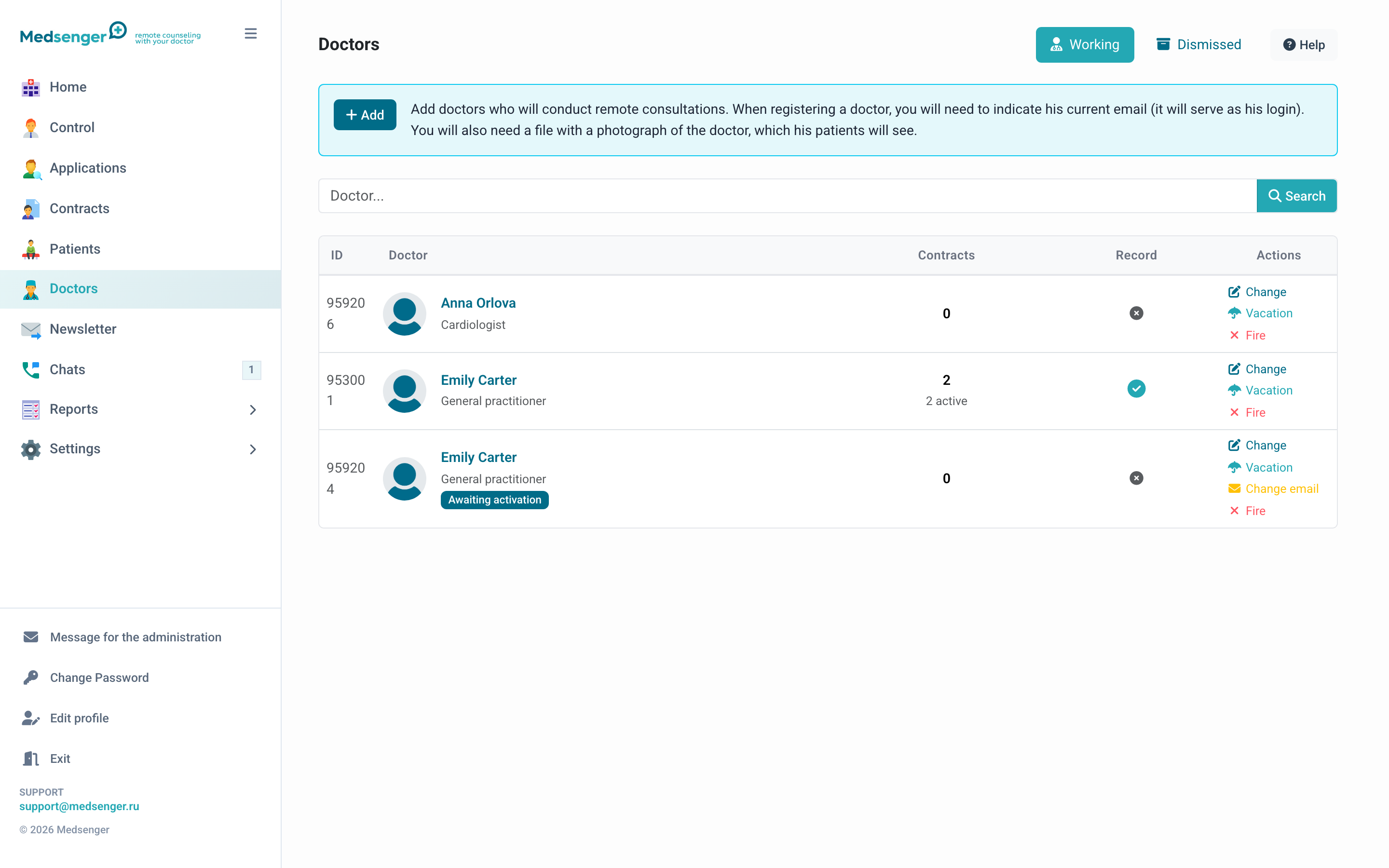
What is visible in the list
The list shows full name, specialty, status, number of consultations, online booking, and quick actions.
The not activated status means the doctor has not followed the email link and set a password yet. The on vacation status means the doctor temporarily does not accept patients and does not take an active clinic seat.
If the clinic has a limit on active doctors, current usage is visible on this page. To free a seat, send the doctor on vacation or dismiss them if they no longer work in the clinic. To increase the limit, contact Medsenger support.
How to add a doctor
- Open Doctors and click Add.
- Enter the doctor's work email.
- Check the email before continuing: the activation email will be sent there, and it will become the doctor's login.
- Fill in full name, specialty, date of birth, and photo.
- Click Add.
The doctor receives an email with an activation link. Before activation, they cannot log in to the cabinet or work with patients.
Patients usually see the doctor's full name, specialty, and photo. Other data is used inside the clinic.
What to check before adding doctors in bulk
- there are enough active seats for all doctors;
- each doctor has a personal work email;
- specialties and photos are prepared;
- response rules are configured;
- if online booking is needed, services and request processing are prepared;
- it is clear which doctors will be publicly visible to patients.
If the doctor is needed only as a consultation assistant or for an internal consilium, do not enable online booking for them without a separate clinic decision.
How to enable booking with a doctor
Open the doctor through Edit and go to consultation and booking settings.
Check:
- whether online booking is allowed;
- whether the description visible to the patient is filled in;
- consultation duration;
- price, if the consultation is paid;
- selected response rule, consultation type, and monitoring scenario;
- the doctor is not on vacation.
If the patient books not directly with a doctor but through a service, main parameters are taken from the service. In doctor settings, it is still important to keep description, photo, and availability correct.
What the patient will see
If doctor booking is enabled, the patient will see the doctor in the online request form: full name, specialty, photo, description, and price if the clinic shows it.
If the doctor is not shown in the form, check online booking, doctor status, service, archive, and payment settings.
How to resend an invitation
If the doctor did not receive the email:
- Find the doctor with not activated status.
- Click the resend action.
- If the email contains an error, fix it before sending.
If the doctor has already activated the account, email is the login. To change the login, contact Medsenger support.
How to send a doctor on vacation
Vacation is for temporary absence. Before vacation, check active consultations: patients should be transferred to another doctor or notified according to clinic rules.
After vacation starts, the doctor does not accept new consultations, and the active seat is freed. When the doctor returns, they can be returned from vacation and patients can be returned if needed.
How to dismiss a doctor
Use dismissal if the doctor no longer works in the clinic. Before dismissal, transfer active consultations to other doctors.
Dismissed doctors remain in a separate list for history. If the doctor later returns, they can be added again.
Common issues
| Situation | What to check |
|---|---|
| Doctor did not receive the email | Email, Spam, resend invitation |
| Doctor cannot log in | Whether the account is activated and email is used as login |
| Doctor is not visible to patients | Online booking enabled, photo and description filled, doctor not on vacation |
| Cannot add a new doctor | Active doctor limit, vacation and dismissed statuses |
| Doctor sees the wrong patients | Consultation assignment, archive, doctor assistant role |